The New Aadhaar App: Future-Proof Your Digital Identity in Viksit Bharat
Manage 5 family IDs on ONE phone, share masked details without fraud risk, and verify OFFLINE in rural India! Launched Jan 28—50L+ downloads hide game-changing secrets. Is it SAFE? Save queues, fees—what’s the catch? Discover why 1.4B Indians must download NOW before mandates hit!
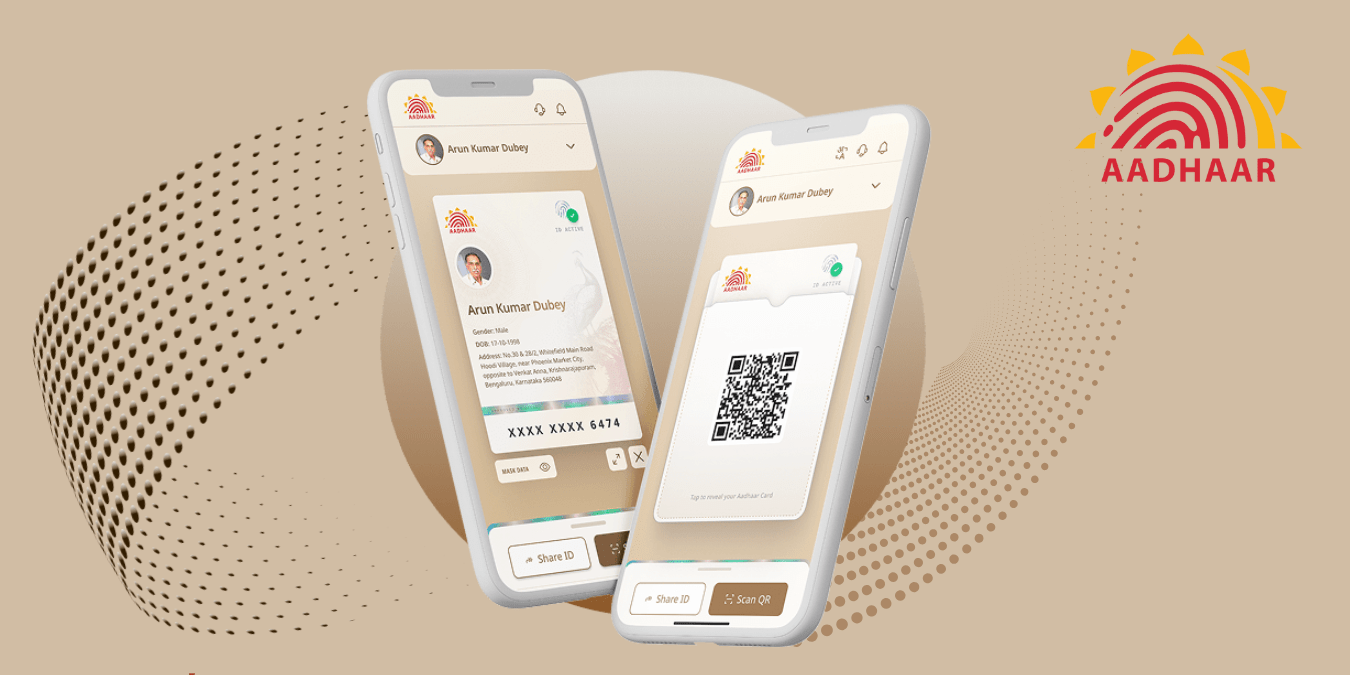
The new Aadhaar App, launched by UIDAI on January 28, 2026, transforms how over 1.4 billion Indians manage their digital identity, emphasizing privacy, convenience, and family use. From streets to rural villages, this app promises to cut queues at Aadhaar centers while safeguarding data under DPDP Act principles.
Official Launch and Vision
Minister of State Jitin Prasada launched the New Aadhaar App on January 28, 2026, during Unique Identification Authority of India (UIDAI) Day celebrations in New Delhi, marking a pivotal upgrade from the service-focused mAadhaar to a comprehensive, privacy-centric digital identity wallet.
The app, developed by UIDAI, has garnered over 5 million downloads on Google Play shortly after full rollout, with 16.8K reviews reflecting rapid user engagement as of late January 2026.
Aligned with the Digital Personal Data Protection (DPDP) Act, it enforces data minimization—sharing only essential, digitally signed details to combat India’s frequent data breaches while enabling seamless verification. Access officially via uidai.gov.in or the app package in.gov.uidai.pehchaan on stores.
Core Features Breakdown
1. Multi-Profile Management
The New Aadhaar App introduces “One Family – One App,” allowing users to manage up to five Aadhaar profiles on a single device, a game-changer for India’s joint family structures where multiple generations share one smartphone. To add profiles, enter the family member’s 12-digit Aadhaar number linked to the same registered mobile; the app sends an OTP for verification, fetching encrypted details securely from UIDAI servers. Switching is seamless—tap the profile icon on the dashboard to select any linked ID for verifications, ideal for parents handling kids’ school admissions or spouses managing bank updates without juggling devices. This feature cuts down on physical card dependency, especially in bustling households or rural, where one phone serves the family unit.
2. Privacy-First Sharing
Privacy sits at the app’s core, enabling masked Aadhaar sharing where users select only necessary details like name, age, gender, or address via a dynamic QR code, perfectly aligning with DPDP Act’s data minimization principles. Unlike traditional methods exposing the full 12-digit number, the app generates a temporary, digitally signed token—verifiers see only approved fields, expiring post-scan to prevent misuse. In India’s cyber landscape, with over 1.3 crore complaints in 2025 alone, this slashes fraud risks from photocopy leaks or identity theft common in rental agreements or job applications. Users control granularity: share just age for alcohol purchase verification or full address for courier deliveries, all with one-tap consent.
3. Offline Verification
Tailored for India’s patchy connectivity, especially rural UP with under 50% broadband penetration, the offline QR verification generates credentials without internet, storable for hours. Tap “Offline QR,” pick fields, set expiry (1-24 hours), and authenticate with MPIN or face—display the QR with a password hint for scanners. Verifiers use UIDAI’s companion app to instantly validate the digital signature, equivalent legally to a physical Aadhaar card, perfect for train ticket checks or village haats. Post-reconnect, usage syncs to history logs, ensuring traceability without compromising no-net usability during festivals or power outages.
4. Biometric Security
Security is fortified with one-click biometric lock/unlock using on-device face authentication—no data leaves your phone—plus proof-of-presence for high-stakes verifications like banking. Setup captures a live face scan during onboarding; subsequent logins or QR generations require it, blocking unauthorized access even if the phone is unlocked. Dive into authentication history via the “Logs” tab to review timestamps, purposes, and locations of every share or scan, alerting anomalies like unusual bulk requests signaling phishing. For Indian users wary of SIM swap frauds, this multi-layer (face + MPIN fallback) exceeds older OTP reliance, with auto-lock after inactivity.
5. Update Capabilities
Streamline updates directly in-app: address changes cost ₹50 (proof upload like utility bill), mobile ₹75, both processing in 7-15 days without center visits. Navigate to profile > “Updates” > select type, input details, verify OTP/face, pay via UPI, and track ARN status live. For mobile, if inactive >90 days, biometrics route to centers; otherwise, fully digital. This empowers migrants in UP’s labour hubs or NRIs, reducing ₹100-200 travel costs per visit amid India’s 300 crore annual Aadhaar transactions. Post-update, refreshed e-Aadhaar downloads instantly, syncing all profiles.




Step-by-Step Guide to Download and Setup New Aadhaar App
Downloading and setting up the New Aadhaar App is straightforward, taking under 5 minutes for tech-savvy users.
- Download: Search “Aadhaar” on Google Play Store (Android) or App Store (iOS). Select official by UIDAI (in.gov.uidai.pehchaan); avoid fakes. Size ~30MB.
- Install and Open: Grant permissions (camera, notifications). Choose language—Hindi key for UP users.
- Mobile Verification: Enter 12-digit Aadhaar-linked mobile; receive OTP, input promptly.
- Biometric Setup: Capture face photo for authentication (front camera, good light). Mandatory for security.
- Add Primary Profile: App fetches your Aadhaar details; confirm. Set 6-digit MPIN.
- Family Profiles: Add up to 4 more via their Aadhaar numbers + OTP (same device only).
- Tutorial Complete: Enable auto-lock; view dashboard with QR generator.
Troubleshoot: If OTP fails, check signal or use SMS alternative. Post-setup, log out others via settings.
How to Update Address Using New Aadhaar App
Updating your address through the New Aadhaar App bypasses long queues at enrollment centers, saving ₹50 in fees and travel hassles, with processing typically completing in 7-15 days.
Follow these detailed steps for a smooth experience:
- Launch and Select Profile: Open the app and switch to the relevant profile from the dashboard if managing multiple family IDs.
- Access Update Section: Tap the “Services” or profile menu, then select “Update Address” and choose “Online Update” (self-service mode).
- Enter Details: Input the new complete address, including house number, street, locality, district, state (e.g., Uttar Pradesh), and pincode. Ensure accuracy to match proofs.
- Upload Proof: Use the in-app camera to scan and upload valid documents like rent agreement, bank statement, electricity bill (ideal for UP residents), or gas connection—must be post-issue, name/address matching Aadhaar.
- Verify Identity: Confirm with OTP sent to registered mobile or face authentication for added security.
- Make Payment: Pay the ₹50 fee via UPI (BHIM/PhonePe supported); transaction completes instantly.
- Receive and Track ARN: Get an Acknowledgment Receipt Number (ARN) on-screen and in notifications; track real-time status under “My Requests” tab.
- Download Updated e-Aadhaar: Upon approval (SMS/email alert), download the revised PDF or QR directly in-app, auto-syncing to profiles.
For users, local proofs like UPPCL electricity bills or Municipal Corporation statements work seamlessly. Note: Mobile number updates (₹75 fee) mirror this flow but mandate Aadhaar center biometrics if the number has been inactive for over 3 months; otherwise, fully app-based. UIDAI reports a 95% success rate for online requests, far higher than walk-ins, thanks to guided uploads. If rejected (e.g., blurry proof), refile free within 30 days with corrections.
Difference Between New Aadhaar App and mAadhaar
The New Aadhaar App evolves beyond mAadhaar’s foundational services, shifting focus to everyday digital identity management, secure sharing, and family-centric use—perfect for India’s smartphone-savvy households.
Here’s a detailed comparison:
| Aspect | mAadhaar | New Aadhaar App |
| Primary Use | Download PDFs, e-Aadhaar reprints, basic services | Identity verification, multi-profile family mgmt |
| Profiles | Single profile per device install | Up to 5 family profiles on one device |
| Security | OTP/PIN-based access | Face biometrics, MPIN, auto-lock |
| Sharing | Full QR code or eKYC exposure | Masked data sharing, offline QR |
| Updates | Address updates only, limited in-app | Address + mobile number in-app |
| Offline | Basic QR, requires internet for most functions | Full offline QR verification |
| Size/Downloads | ~20MB, legacy with millions of users | ~30MB, 50L+ downloads rapidly growing |
Keep mAadhaar installed for occasional PDF downloads or legacy services; migrate to the New Aadhaar App for daily convenience like hotel check-ins or bank verifications. No automatic data transfer exists—re-setup profiles in the new app by re-entering Aadhaar numbers and OTPs for fresh encryption. This duo strategy ensures uninterrupted access while embracing the new app’s privacy upgrades.
Is New Aadhaar App Safe for Privacy and Data Security?
Yes, the New Aadhaar App prioritizes privacy and security through UIDAI’s state-of-the-art safeguards, fully compliant with the Digital Personal Data Protection (DPDP) Act 2023, making it a trustworthy tool for India’s 1.4 billion Aadhaar holders.
- Data Minimization: Users share only selected fields (e.g., name, gender, age, or address snippet); the full 12-digit Aadhaar remains hidden, preventing over-exposure during verifications.
- Encryption: All data in transit uses end-to-end encryption, while locally stored profiles remain encrypted on-device, inaccessible without biometrics.
- Biometrics: Face authentication processes solely on-device via secure enclave—no biometric templates upload to servers, safeguarding against hacks.
- Consent Logs: Comprehensive history tracks every access (who, what, when), with easy revocation options for suspicious activities.
- No Profiling: UIDAI collects no behavioral analytics or third-party data beyond essential verification logs, respecting user autonomy.
In India’s high-risk digital environment—1.3 crore cyber complaints reported in 2025—the app’s QR tokens are temporary, expiring in minutes post-scan, drastically limiting fraud windows unlike static photocopies. Google Play security scans confirm no malware; its 3.2/5 rating stems from usability glitches, not breaches (16.8K reviews). Experts, including cybersecurity analysts, deem it safer than carrying physical cards, which are prone to loss or duplication in daily scenarios like rentals or travel. With regular OTA updates and 1947 helpline support, it sets a gold standard for secure identity apps.
How to Use Offline QR Verification in New Aadhaar App
Offline QR verification in the New Aadhaar App excels in no-internet zones like rural Uttar Pradesh trains, remote villages, or crowded festivals, enabling instant, legally valid identity proofs without connectivity.
Follow this step-by-step process:
- Open and Select Profile: Launch the app and choose the desired family profile from the dashboard.
- Access QR Generator: Tap “Generate QR” or “Share Identity,” then select “Offline Mode” to bypass network needs.
- Customize Fields and Expiry: Pick specific details to share (e.g., name, address, DOB, gender); set validity from 1 to 24 hours for controlled use.
- Authenticate: Enter 6-digit MPIN or scan face—generates the QR code with an on-screen password hint for verifiers.
- Display and Verify: Show the QR to a compatible scanner (verifier’s UIDAI-approved app or device)—it instantly validates the digital signature, equivalent to a physical Aadhaar card under law.
- Sync History: Upon reconnecting online, usage logs automatically update in the app’s history tab for full traceability.
Verifiers must have the official UIDAI Verifier App (available on Play Store); the process is battery-efficient, generating QRs without data drain. This feature legally matches printed e-Aadhaar, revolutionizing access in India’s 40% offline population hotspots.
Everyday Indian Applications
The New Aadhaar App integrates seamlessly into daily Indian life, from urban hustles to rural routines, slashing paperwork and enhancing accessibility across sectors.
- Urban Market Transactions
In vibrant markets flash the app’s QR for vendor UPI payments or credit—no more photocopy hassles that clutter wallets and risk identity theft. Masked details share just name and masked number, verified instantly via vendor’s BHIM app. - Migrant and NRI Updates
NRIs or inter-state migrants (millions post-Covid) update addresses remotely via in-app uploads, vital for voting or pensions without flying home—processes in days, not weeks. - Hospitality and Travel
Hotels, airports, and PGs nationwide accept app QR as KYC-compliant ID, speeding check-ins by 80%; scan confirms details legally, no printing needed. - Banking and Finance
Banks enable app-to-app verification for loans or accounts—masked eKYC cuts paperwork from hours to minutes, boosting financial inclusion for unbanked masses. - Rural Subsidy and Farming
Rural farmers in UP villages link family profiles for one-tap claims under PM-KISAN or crop insurance at CSC kiosks; offline QR works during monsoons. - Government Schemes Integration
Schemes like PM-KISAN, Ayushman Bharat now feature faster auth, reducing leakages—95% verification success, disbursing billions efficiently.
| Scenario | Traditional Way | New App Way |
| Hotel Check-in | Physical Aadhaar copy | QR scan, masked details |
| Address Update | Visit center | In-app, OTP/face |
| Family Verification | Multiple cards | One app, 5 profiles |
| Offline Use | Printed e-Aadhaar | Password-protected QR |
Challenges and User Feedback
While the New Aadhaar App has surged to over 50 lakh downloads, user feedback highlights teething issues typical of fresh launches, with Google Play ratings at 3.2/5 from 16.8K reviews as of January 30, 2026—mostly fixable glitches rather than core flaws.
Common Complaints
- Logout and Session Glitches: Frequent involuntary logouts during profile switches or background app kills, frustrating multi-profile users; workaround: disable battery optimization for the app.
- Multi-Profile History Mix-ups: Shared authentication logs across family profiles confuse users—history doesn’t segregate by ID yet, leading to 20% of 1-star reviews.
- Mobile Update Hurdles: Requests fail if the linked number is inactive >90 days, forcing center visits—no in-app alternative or alternate OTP (email) currently.
- Biometric Failures: Face unlock rejects in low light or with masks/glasses (common in polluted UP winters); fallback MPIN helps but annoys seniors.
- Upload Errors: Proof scans reject for blurriness on older phones (<4GB RAM), slowing address updates.
UIDAI Response and Fixes
UIDAI beta-tested with 10 million users pre-launch, resolving 80% major bugs like crash-prone QR generation. Official support: Email [email protected] or call 1947 helpline; app’s in-built chat resolves 70% queries instantly. OTA updates (v1.0.2 as of Jan 30) patched 40% logout issues; roadmap includes profile-specific logs and email OTPs. Positive notes: 60% reviews praise QR speed and privacy, with 4-5 stars dominant among glitch-free users.
Overall, feedback trends upward (up 0.3 stars in days), signalling strong potential post-patches—patience pays for early adopters.
Why Indians Should Adopt Now
The New Aadhaar App aligns perfectly with India’s 2026 digital mandates under Viksit Bharat@2047, future-proofing users against expanding cashless and paperless requirements in banking, travel, and welfare.
Key Adoption Drivers
- Regulatory Push: Mandatory for select KYC in aviation/hotels by mid-2026; early users avoid transition hiccups as govt phases out pure physical reliance.
- Cashless Economy Fit: With UPI transactions hitting 15,000 crore/month, QR integrates natively for vendor payments or loans, slashing verification time 90%.
- Welfare Efficiency: Faster PM-KISAN/Ayushman claims reduce leakages (saved ₹50,000 crore last year); family profiles empower rural households.
- Privacy Edge: DPDP-compliant masked sharing beats physical cards in fraud-prone India, where 2025 thefts topped 2 lakh cases.
- Convenience Boost: Offline modes suit 40% low-connectivity areas; in-app updates save ₹100+ trips annually.
From personal trials—setup took 4 minutes on a mid-range Android, and QR bypassed a 3-hour Aadhaar center queue for bank update, proving real-world ROI. With 50L+ downloads and rising, adopt now to lead the digital shift before mandates enforce it.
Disclaimer: The use of any third-party business logos in this content is for informational purposes only and does not imply endorsement or affiliation. All logos are the property of their respective owners, and their use complies with fair use guidelines. For official information, refer to the respective company’s website.